

Let’s be honest—AI can sound expensive, especially if you’re a small team juggling big dreams and a tight budget. But here’s the good news: you don’t need a Silicon Valley budget to use AI. In fact, many of the best tools are free or extremely affordable.
Whether you’re running a nonprofit, a women-led creative business, or a faith-based organization, AI can save you time, reduce burnout, and help you work smarter—not harder.
What’s the Real Cost of AI?
Is AI expensive for small businesses? Not necessarily.
The truth is, AI pricing varies widely. Enterprise-level tools can be costly, but many platforms offer free tiers, nonprofit discounts, or creator-focused plans that are built for lean teams. The real cost isn’t always financial—it’s often the time it takes to find the right fit.
6 Free or Low-Cost AI Tools Perfect for Small Teams
These AI tools are powerful, approachable, and budget-friendly. Perfect for nonprofits, solopreneurs, and creatives alike.
1. ChatGPT (Free & Plus Plans)
Use it for:
- Drafting emails, social posts, or grant narratives
- Brainstorming content ideas
- Creating first drafts of event scripts or newsletters
ChatGPT is one of the most versatile AI writing tools available. The free version gives you access to GPT-3.5, which is powerful enough for most writing and content tasks. The paid version (GPT-4) offers more accuracy, faster output, and better reasoning—ideal if you’re writing complex content or need help organizing large projects.
Nonprofit Discount: No official nonprofit discount at this time, but the free version covers most needs.

2. Canva Magic Studio (Free & Pro)
Use it for:
- Designing graphics, flyers, and presentations
- Generating branded content quickly
- Auto-adjusting layouts and styles
Canva’s Magic Studio features (like Magic Design and Magic Write) make it easy to generate branded visuals, write captions, or create templates in just a few clicks. The drag-and-drop editor is intuitive—even if you don’t consider yourself “techy.”
Nonprofit Discount: Canva offers free Canva Pro access for nonprofits. You can apply on their website with documentation of your 501(c)(3) status.

3. Otter.ai (Free & Paid Tiers)
Use it for:
- Transcribing meetings, interviews, or webinars
- Pulling quotes or key takeaways
- Creating summaries for board or donor updates
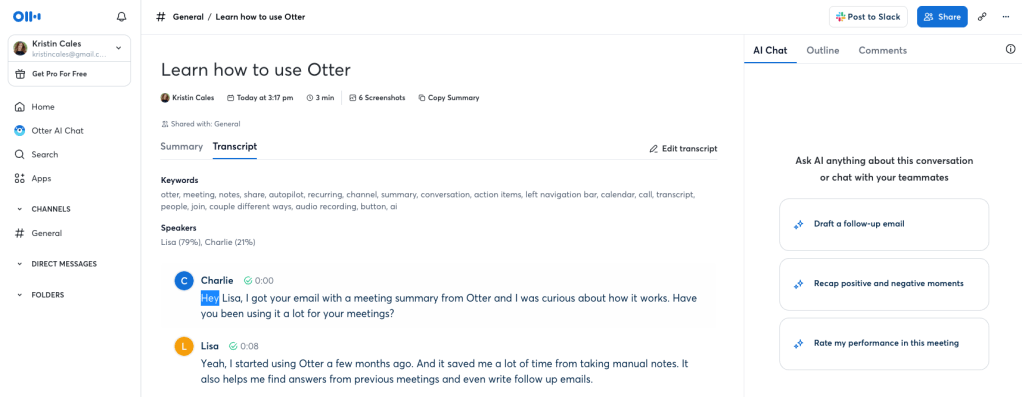
Otter.ai uses speech-to-text AI to create real-time transcriptions of meetings and recordings. It’s perfect for taking notes during virtual sessions or documenting important discussions for your team or board. The AI also identifies keywords and action items, making your transcripts more than just raw text.
Nonprofit Discount: Otter offers discounted pricing for nonprofits and educational institutions upon request.
4. OpusClip (Freemium)
Use it for:
- Turning long videos into short social clips
- Auto-captioning and optimizing for Instagram or TikTok
- Repurposing sermon clips, interviews, or workshops
OpusClip uses AI to automatically detect the best soundbites from long-form videos and convert them into short, shareable clips. It even adds dynamic captions, auto-crops faces, and suggests viral hooks. This tool is a huge time-saver for anyone doing video marketing or trying to increase reach on social platforms.
Nonprofit Discount: OpusClip doesn’t list a specific nonprofit discount but offers free credits and generous monthly usage on the freemium plan.
Image suggestion: OpusClip interface showing video clips being generated
ALT Text: OpusClip creating short-form content for faith-based organization** OpusClip interface showing video clips being generated
ALT Text: OpusClip creating short-form content for faith-based organization

5. Notion AI (Free for Nonprofits)
Use it for:
- Organizing content calendars and meeting notes
- Summarizing research or brainstorming documents
- Auto-generating copy inside your planning tools
Notion combines the best of a task manager, content planner, and AI assistant. With Notion AI, you can generate copy, summarize text, and even turn messy notes into clean action plans—all in one place. It’s ideal for women-led teams and mission-driven brands that need to stay organized without hopping between tools.
Nonprofit Discount: Notion offers free Plus plan access for eligible nonprofits.

6. Motion or Reclaim.ai (Freemium)
Use it for:
- Automatically blocking time on your calendar
- Managing deadlines, meetings, and focus blocks
- Prioritizing tasks based on real availability
Both Motion and Reclaim.ai are smart calendar tools that use AI to rearrange your schedule based on changing priorities and availability. They help avoid overbooking, protect your focus time, and make sure essential tasks don’t fall through the cracks.
Nonprofit Discount: Reclaim.ai offers a 20% discount for nonprofits. Motion does not currently list a nonprofit discount.

Real Talk: The Cost of Not Using AI
If you’re spending 10+ hours a week on admin tasks, juggling email, social, and content without support—you’re paying in time and stress.
For small teams with big missions, AI isn’t a luxury. It’s a lifeline.
Final Thoughts
AI doesn’t have to break your budget. It can help you stay focused on the work that matters—serving your community, creating your art, or leading your ministry.
Start small. Test what works. And remember: you don’t need to do everything manually to be mission-aligned.
FAQ: AI Affordability for Small Teams
Q: What are the best free AI tools for nonprofits and small businesses?
A: Top picks include ChatGPT, Canva, and Otter.ai—each offering generous free tiers or nonprofit discounts. These tools help small teams automate content, design, and admin tasks affordably.
Q: Are AI tools really affordable for small teams?
A: Absolutely. Many offer freemium plans, and some—like Canva Pro for Nonprofits—are completely free with 501(c)(3) status. Look for low-cost AI tools that replace hours of manual work.
Q: How do I know if investing in AI is worth it for my business or nonprofit?
A: Consider this: If a tool saves you even 3–5 hours a week, that’s time you can reinvest in strategy, fundraising, or community-building. Use free trials to measure real ROI before committing.
Q: Will AI replace the need for a staff member?
A: No—but it can support small teams by handling repetitive tasks like transcription, captioning, or content drafts. Think of AI as scalable support, not a replacement for human connection or creative thinking.
Q: Where can I find discounts or free AI access for nonprofits?
A: Tools like Canva, Notion, Otter.ai, and Reclaim.ai offer nonprofit programs. Check their websites’ pricing or nonprofit pages for details.
About the Author
Kristin Cales helps women-led brands and nonprofits use AI and authentic messaging to scale their mission with clarity. With a background in ministry, storytelling, and marketing, she’s passionate about tools that free up time and amplify impact.
References
Affordable AI tools for small teams: OpenAI’s ChatGPT Pricing outlines both free and paid plans suitable for solopreneurs and nonprofits.
AI design tools with nonprofit discounts: Canva for Nonprofits offers free Pro access to qualified organizations.
Real-time transcription tools: Otter.ai does not currently advertise a dedicated nonprofit discount page, but you can reach out to their support team to inquire about educational or nonprofit pricing options.
AI-powered calendar automation: Reclaim.ai Pricing includes a section on their 20% nonprofit discount.Workspace tools for mission-driven teams: Notion for Nonprofits provides free access to their Plus plan for eligible organizations.
 kristincales.com
Leave a comment